Creating WordPress plugins is a big part of what I do. Part of that is distribution with releases. There’s a lot of files that don’t need to be in the finished product. In fact, some plugins would be 10x the size if I included the node_modules directory, for example. Even when size isn’t the concern, all those useless files cluttering up the directory – like the .DS_Store files have no business being in a production release.
Sometimes, I manually create a copy of the plugin and strip out the extra files and then zip it up, but it just feels wrong to have to do that. At one point, I had a gulp file that would build and minify the resources and then create a copy of the plugin without all of the build files and zip it up. The trouble with that is that it was an extra step in creating a new plugin, and it felt a bit redundant to have the same file in all of my plugins.
The Solution: An Interactive Build Script
So, today, I decided I wanted a shell script to live in my plugins directory that would create a plugin release for any given plugin. I gave Claude Code the general requirements of what I wanted, and I wasn’t even thinking about versioning, but it captured the version from the plugin without my asking for it and added it to the zip file.
How It Works
The script follows a straightforward process:
Version Detection: First, it reads the plugins’s main file and extracts the version number from the header.
Clean Build Directory: It creates a temporary directory and uses rsync to copy the plugin files while excluding everything that doesn’t belong in production. The exclusion list is comprehensive, covering version control files ,development dependencies, documentation, and more. To make it a bit more versatile, I just added support for a .buildignore file to add custom exclusions or override default exclusions.
Archive Creation: Once the clean copy is ready, it creates a zip archive with a proper name format. If an older version already exists, it removes it first, to avoid confusion.
No Build Step: Despite the name, you might notice that there’s no build step listed. My immediate need was the packaging step, but I’m currently working on adding a build step, complete with a buildconfig.json file to handle any use case.
Building It with Claude Code
I’ve been experimenting with Claude Code for several months now, and this project was a perfect test case. I spent 5-10 minutes on something that might have taken an hour or two, because, while I understand it, shell scripting is not something I do everyday. One thing I like about Claude Code in general is that it is very good at documenting a project’s architecture through markdown notes. Having AI remember your decisions is incredibly valuable.
The initial version of the script came together quickly, but then I remembered that I didn’t want to have to type a full plugin name as a parameter. I was really impressed with how Claude Code Handled refinements. When I asked it to scan the plugins directory and give me a menu, it quickly restructured the script to accommodate both approaches without breaking existing functionality.
One thing I’ve learned from building tools with AI assistance is that the quality of your results depends heavily on how well you can articulate what you want. If you can describe the problem or feature in a clear an detailed way, the AI can produce something genuinely useful, but also, not all AI models are created equal. I’ve also worked with OpenCode, which is a similar tool that allows you to several different models, and, despite having a similar markdown context storage, Grok Code Fast 1 is laughably bad at producing the desired output.
The Broader Picture: AI-Assisted Development
This script is a small example of how AI coding tools can be remarkably useful. It’s not about replacing developers or magically generating perfect code. It’s about accelerating the tedious parts of development so you can focus on the parts that actually require human judgement and creativity.
Just like you wouldn’t use a hammer for every construction task, you need to know when AI is the right tool for the job. There are some things it excels at, like simple scripts or UI layouts. You also need to know what you’re building and why. You need to understand the code well enough to review it, test it, and maintain it. AI coding tools are extremely powerful, but they’re not fully autonomous – not yet. I like to think of them as highly flexible scaffolding tools.
Getting Started
If you want to use this script for your own WordPress plugin development, the setup is straightforward. you’ll need a standard Unix environment with bash, rsync, zip, and a few other common utilities. If you’re running Windows, WSL is a good choice. If you’re on a Mac or Linux, obviously, you’re already set. Place the script in your plugins directory, make it executable with chmod +x build-release.sh, and you’re ready to go.
You can find the script on Github



 Watches have been out of vogue for a long time now, which to me is just absurd. It’s just unbelievable the number of people who I have encountered that thought it made more sense to pull a brick out of your pocket to check the time rather than glancing at your wrist. It’s as if for a decade or so, we went back to the age of pocket watches.
 ersonally, I’ve never been one to follow the herd. I never really stopped wearing a watch until a couple years ago when I had three digital watches in a row fail on me within a couple months of ownership. They never even got wet aside from hand washing. Maybe I became one of those minor
 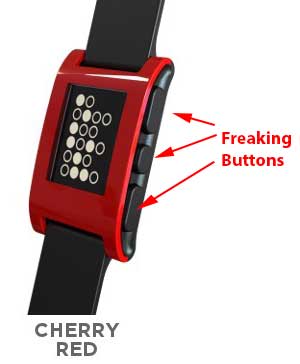 lowest price point, yet it was very responsive – much more so than the Meta watch, and it did the main thing most people want a smart watch for – it showed notifications – including caller ID. It also has an accelerometer, so you can use it as a pedometer or a sleep monitor. Probably the biggest selling point is the battery life – you could get a whole week out of it before having to charge it.
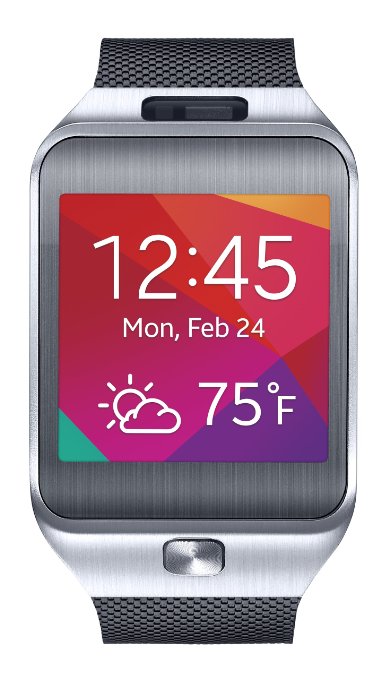 On the other end of the spectrum is the Samsung Gear 2, with a 1.63-inch AMOLED touchscreen, a 720p camera for shooting wrist video, or just being a stealthy creeper, an IR-blaster for controlling your TV so you don’t have to get up and find the remote, and music control… oh, and did I mention you can make and receive calls directly from the watch? This, of course isn’t very practical in a crowded room – aside from the ability to expediently reject unwanted calls, but when you’re driving, it’s amazing. The call quality exceeds that of my Galaxy S4. Most people I talk to don’t even know they’re on speakerphone until I tell them (and I’ve been asking).
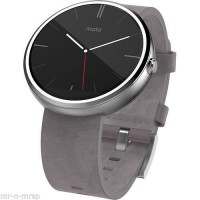 The latest on the market is the Moto 360. It doesn’t quite have the hardware that the Samsung Gear has – there’s no camera or IR blaster, but it oozes with style. It looks like a standard watch, for the most part, and charges using a contact-less charger. I guess that’s convenient or something – I mean, you still have to take it off your wrist. Where it really shines, though is its full use of Google Now, meaning the voice command capabilities are pretty kickass.